Cyber news, tools & one smart career path.
5 min read

Quick Reality Check
LinkedIn has been accused of quietly scanning users' browsers every time they load the site, according to an investigation dubbed BrowserGate. The report alleges that LinkedIn's code collects sensitive data such as lists of installed browser extensions and device fingerprints, and reportedly sends that information to its servers and third parties without explicit user consent
What happened:
According to the investigation, every time you open LinkedIn in a Chrome‑based browser, hidden JavaScript automatically scans your browser for installed extensions and software. The code checks for more than 6,000 specific Chrome extensions, then compiles information about what tools you use and how your device is configured. This data is reportedly encrypted and attached to your session and may be shared with LinkedIn’s servers and outside companies without clear notice or explicit consent.
LinkedIn denies that it uses this data to infer sensitive information and says the scans are meant to detect extensions that scrape data or violate its terms of service
Why it matters:
When a large professional network silently scans your browser for extensions and sends that data to its servers and third‑party companies, it’s collecting information about what tools you use, what security software you have, and what kinds of plugins you prefer.
That’s behavioral data. It’s valuable. And if they are not asking permission, they’re stripping away your ability to decide whether you’re comfortable with that. The silent part makes it dangerous. Hidden code buried in tracking scripts removes your choice entirely.
When that data goes to third parties, you have no idea who they are, what they do with it, or how secure they are. Some of those companies may be data brokers or weaker targets for attackers, which means your information spreads further and becomes easier to exploit.
Read more here
60-Second Protection Fix
Here are the concrete steps you can take right now to limit what LinkedIn can access:
-
Switch to a privacy‑focused browser. Firefox or Edge with strict tracking‑prevention settings will block a lot of what LinkedIn tries to collect.
-
Tighten browser permissions for LinkedIn. In your browser settings, block LinkedIn’s access to location, camera, and microphone. Audit what’s connected to your LinkedIn account.
-
Go to LinkedIn’s account settings, review third‑party apps and services, and unlink anything you don’t actively use. Turn off LinkedIn’s AI‑training opt‑in. Go to Settings → Data Privacy → Data for generative AI improvement and turn it off.
-
Consider using a VPN. It won’t stop extension scanning, but it hides your IP and encrypts traffic, limiting what third parties can see about your browsing.
What You Missed This Week
Think your private life is safe because your phone is powered down? I sat down with the man who wrote the "Bible" of hacking, Stuart McClure. As the former Global CTO of McAfee, Stuart reveals the chilling truth: your phone is never truly off. Listen or watch it here

Vibecoding Doesn’t Remove Risk. It Hides It.
99% of organizations are already vibecoding. Prompts can generate code in seconds, but they can also introduce risk just as fast.
From slopsquatting attacks on hallucinated packages to overprivileged AI agents, new risks are scaling faster than most teams can detect or fix.
Get the Executive Guide to Vibe Coding to see what to watch for and how to reduce risk without slowing development.

*Sponsored by Palo Alto Networks
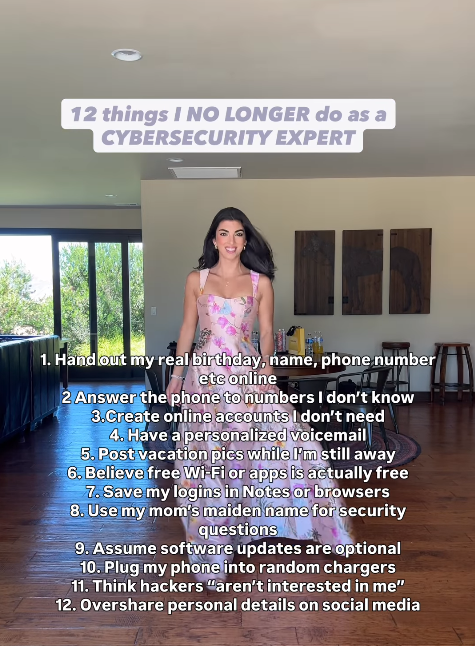
12 things I NO LONGER do as a CYBERSECURITY EXPERT
I was sobbing as I watched the crew tell NASA that they’ve named the newly discovered crater after Commander Reid’s late wife.

Gives us a new perspective on “love you to the moon and back”! It’s also a reminder that whether it’s space exploration or cybersecurity, the work we do is human at its core-we’re everyday people building and protecting something bigger than ourselves.
Let’s keep building together!
Stay protected,
Cybersecurity Girl
Know someone who’d enjoy this? Pass it along and have them sign-up here! And if you have thoughts or feedback, just hit reply, I’d love to hear from you.


Responses